
How to sign a PDF online
Sign a contract, a form or a letter in a minute, without printing, signing on paper and scanning it back in.
Steps
- Open the PDF in the editor and scroll to the page you want to sign.
- Click Insert in the tool row and choose Signature. Or right-click the exact spot where the signature should go and choose Add signature here.
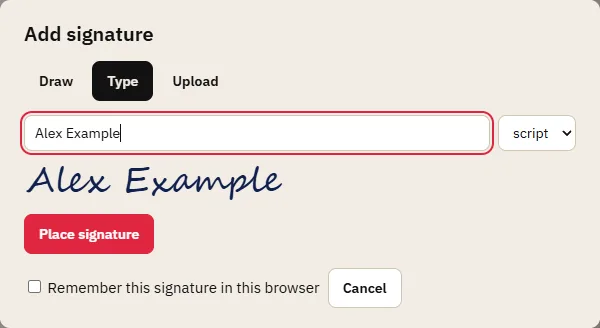
- Make your signature in one of three ways:
- Draw it with the mouse, a pen or your finger;
- Type your name and pick a style (script, serif or sans);
- Upload a photo or scan of your signature (PNG or JPG). The white paper background is removed, so only the ink shows on the page.
- Click Place signature. Drag it into position and drag its corners to resize it.
- Save the signed PDF.
Getting a signature that looks right
- Drawing with a mouse rarely looks natural. On a laptop, a touchpad with a finger works better; on a phone or tablet, draw with your finger or a stylus.
- Uploading a photo gives the most natural result. Sign on plain white paper with a dark pen, take the photo in good light, straight from above, and crop it close to the signature before uploading.
- Size: a handwritten signature is usually about 4–6 cm wide. Compare it with the text on the page; a signature much larger than the signature line looks odd.
- Placement: zoom in (Ctrl+=) to put it exactly on the line. The arrow keys nudge the selected signature by small steps.
Signing several documents
Tick Remember this signature in this browser when you make it. It is kept in your browser's own storage, never on our server, and next time you can choose Use saved signature instead of making it again. On a shared or public computer, leave this box unticked.
Documents you open in several tabs can all be signed with the same saved signature, one after another.
Is a signature added this way legally valid?
A signature image on a PDF is a simple electronic signature under the EU's eIDAS rules. Courts can't reject it just because it's electronic, and for many everyday documents (letters, delivery notes, internal approvals, many agreements between businesses) it is enough. Some documents need an advanced or qualified electronic signature, which is made with a personal certificate and can be checked cryptographically. Typical examples are some employment, property and court documents. Check what the recipient or the law requires for your document. PDFRonin doesn't add certificate-based signatures.
Your privacy
The document and your signature are processed in our server's memory only while you edit, and are never stored on disk. See the privacy page for details.
Tips
- Add the date next to your signature with a text box.
- If the PDF is a form, fill it in first, then sign.
- If someone else needs to sign as well, send them the signed PDF; they can add their signature the same way.
- Signing a PDF that already has a digital (certificate) signature makes that signature invalid. See checking a PDF's digital signature.