
How to check a PDF's digital signature
Find out whether a signed contract, certificate or official letter is still exactly as it was signed, and what happens to the signature if you edit the file.
Two kinds of "signed PDF"
A signature image is a picture of a handwritten signature placed on the page, like the ones you add yourself. It shows who meant to sign, but nothing in the file can prove it wasn't copied or changed.
A digital signature is different. It is a cryptographic seal made with the signer's certificate: the file's exact bytes are fingerprinted and the fingerprint is locked with the signer's private key. If a single byte changes afterwards, the seal no longer matches. Banks, government services, e-invoicing systems and qualified signature providers use digital signatures. A digital signature may or may not also show a picture or a stamp on the page.
Check the signatures
- Open the PDF in the editor.
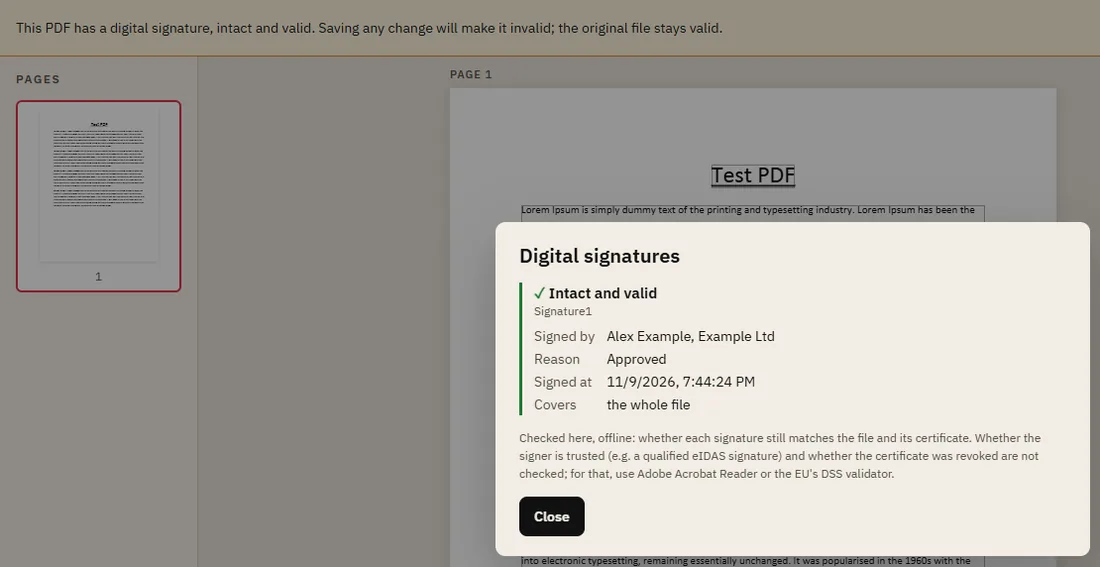
- If the file has digital signatures, a banner at the top says so, with a short verdict: for example "intact and valid", or that a signature did not pass the check.
- Click Details in the banner, or Show signatures under Digital signatures in the Properties panel.
For each signature you see who signed it (and their organisation), the reason and time given, any timestamp, and what the signature covers.
What the results mean
- Intact and valid: the signed part of the file hasn't changed since signing, and the seal matches the signer's certificate.
- The file was changed after signing: someone altered the signed content. Don't rely on this copy; ask the sender for the original.
- The signature does not match the signer's certificate: the seal is broken or forged. Treat the document with suspicion.
- Could not be checked: the signature uses a format or algorithm that couldn't be read. Check it with one of the tools below.
Covers tells you how much of the file is sealed. Signed PDFs can legitimately get additions after signing, such as a second signature or filled-in form fields. "The file as it was when signed" means something was added later; Added since says what kind of change it was.
What this check doesn't tell you
The check runs on our server without contacting anyone else. It proves the file and the seal match. It does not check whether the signer's certificate is trusted (for example a qualified signature under the EU's eIDAS rules), or whether the certificate was revoked. A seal can be intact and still come from a certificate anyone could create. For a full legal validation, use Adobe Acrobat Reader or the European Commission's free DSS validation service.
Why editing breaks a digital signature
Editing a signed PDF and saving it changes its bytes, and PDFRonin saves a new file rather than appending to the old one. Either way, the seal no longer matches. That is the whole point of a digital signature: nobody can change a signed document unnoticed, including you. So:
- When you open a signed file, the banner reminds you that saving any change will make the signatures invalid. After your first edit it warns you again.
- To keep the signatures, undo your changes (Ctrl+Z) and don't save, or keep the original file next to your edited copy.
- Need to add your own signature to a document someone signed digitally? Adding a signature image here breaks theirs. Use the signing tool the sender recommends instead.